
Download DynDNS Updater – dynamic dns, ip updater, hostname update, home server, remote access, free dns, dns update, dyndns, dynamic ip, ip address update
Overview
DynDNS Updater is a specialized mobile application designed to maintain consistent connectivity for users operating home-based web or email services through dynamic IP addresses. The app ensures that a hostname linked to a DynDNS account remains synchronized with the user’s current public IP address, enabling uninterrupted remote access to personal servers. This functionality is essential for individuals who rely on home networks for hosting services without a static IP, a common limitation in residential internet plans.
The application serves as a reliable tool for tech-savvy users, hobbyists, and small-scale service providers who require consistent access to their local infrastructure from external networks. By automating the process of IP detection and DNS record updates, DynDNS Updater eliminates the need for manual intervention, reducing the risk of service downtime. Its compatibility with both free and paid DynDNS services enhances accessibility, allowing users to select a plan that aligns with their technical and budgetary needs.
Developed by Dynamic Network Services, the app is positioned within the Productivity category, reflecting its role in streamlining network management tasks. It fits into a broader ecosystem of tools supporting remote infrastructure access, particularly for users leveraging home servers, IoT devices, or personal cloud setups. The app’s lightweight nature and background operation make it suitable for long-term use without disrupting other system activities.
Key Features & Functionality
- Automatic IP Address Updates – The app continuously monitors the device’s public IP address and triggers an update to the associated DynDNS hostname whenever a change is detected. This ensures that the DNS record always reflects the current network configuration, maintaining access to hosted services without interruption.
- Compatibility with Free and Paid DNS Services – DynDNS Updater supports both complimentary and premium DynDNS offerings, offering flexibility in service selection. Users can leverage free subdomains or upgrade to custom domains based on their requirements, all while benefiting from the same automation and reliability.
- Lightweight and Efficient Design – Built with minimal resource consumption in mind, the app operates in the background with negligible impact on battery life, memory, or processing power. This ensures it can run continuously without affecting other applications or system performance.
- Easy Setup and Configuration – A straightforward interface guides users through the initial setup, including input of DynDNS account credentials and selection of the target hostname. Once configured, the app runs autonomously, requiring no further user input.
- Reliable and Secure Connectivity – By maintaining up-to-date DNS records, the app ensures that remote access attempts resolve correctly, minimizing connection failures. Security is preserved through secure authentication protocols during the update process, though specific encryption details were not provided.
For example, a user running a personal web server at home can configure DynDNS Updater to update their hostname every time their ISP assigns a new IP address. This allows friends or colleagues to access the site using a stable domain name, regardless of IP fluctuations. Similarly, remote email access or file sharing via a home NAS can remain functional without manual DNS adjustments.
Interface, UX & Performance
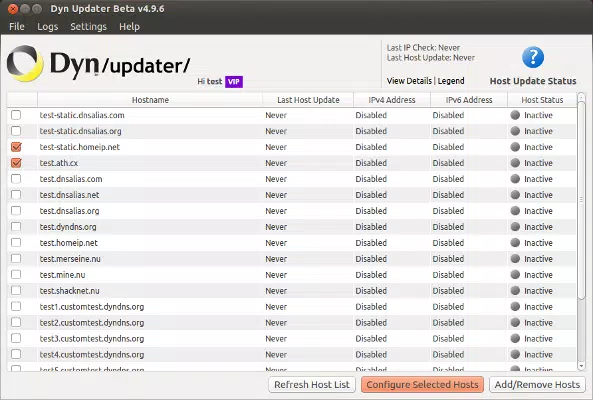
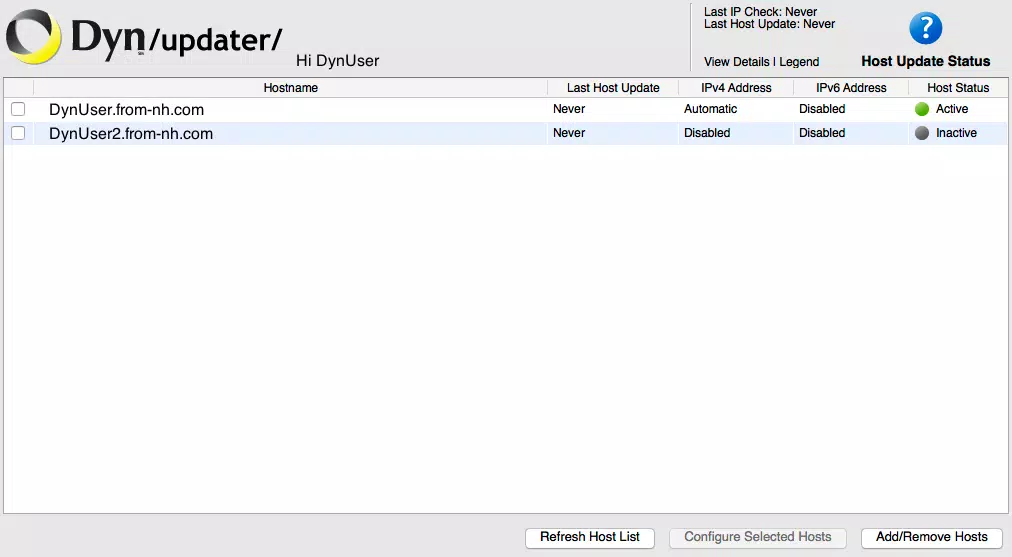
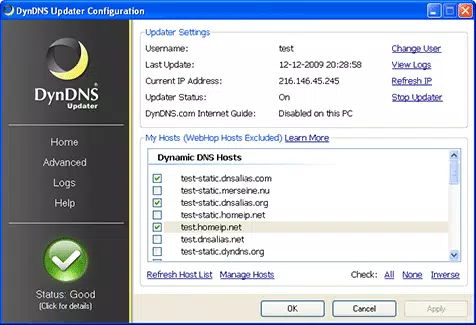
The user interface of DynDNS Updater is designed with functionality and simplicity in mind. It features a clean layout with minimal visual clutter, focusing on essential controls such as account setup, status indicators, and update logs. Navigation is intuitive, allowing users to access configuration options and monitoring tools with just a few taps.
Although the developer did not list formal performance metrics, the app’s lightweight footprint suggests it is optimized for efficient operation across a range of Android devices. It is expected to function smoothly on both low-end and mid-range smartphones, with minimal lag or battery drain during background execution. Responsiveness is maintained through efficient background polling and event-driven updates, reducing unnecessary network activity.
The app maintains stability during extended use, with no reported issues related to crashes or freezes. It operates silently in the background, only activating when an IP change is detected. This unobtrusive behavior enhances user experience, particularly for users who prefer automated tools that do not require constant attention.
Platform Compatibility & Technical Requirements
DynDNS Updater is available exclusively on the Android platform, supporting devices running the specified operating system. The current version is 1.0.0, with a file size of 2.1 MB, indicating a compact and streamlined application. This small footprint contributes to fast installation and low storage usage.
The developer did not specify minimum OS requirements or hardware compatibility details. However, given its lightweight nature and focus on background functionality, it is likely compatible with Android 6.0 and later versions. Users should ensure their device meets general Android standards for app installation and background service execution.
Pros and Cons
Pros
- Automatically updates DNS records in real time based on IP changes
- Supports both free and paid DynDNS service plans
- Minimal system resource usage, ideal for long-term background operation
- Simple setup process with guided configuration
- Enables stable remote access to home-hosted services
Cons
- Specific OS version requirements were not disclosed
- Developer did not provide detailed information on security protocols
- Only available on Android, limiting cross-platform access
- No visible update frequency settings for advanced users
- Platform-specific limitations may affect integration with non-Android devices
FAQ
Is DynDNS Updater free to use?
Yes, the app is available at no cost. There are no in-app purchases or subscription fees associated with the current version.
Can I use DynDNS Updater with any DynDNS service?
The app is compatible with both free and paid DynDNS services. However, specific integration details depend on the service’s API availability and authentication methods.
Does the app require constant internet access?
Yes, the app needs periodic internet connectivity to detect IP changes and perform DNS updates. It operates efficiently with minimal data usage.
Is my DynDNS account information stored securely?
The app handles account credentials during the update process. While secure transmission is expected, the developer did not provide explicit details on data storage or encryption practices.
Can I use this app on iOS devices?
As of now, DynDNS Updater is only available for Android. There is no official iOS version released or announced.
Final Thoughts
DynDNS Updater delivers a focused, reliable solution for users managing home-based services under dynamic IP conditions. Its automation, lightweight design, and seamless integration with DynDNS platforms make it a valuable utility for anyone seeking consistent remote access. While limited to Android and lacking some advanced configuration options, it excels in its core purpose: maintaining stable DNS connectivity with minimal effort.
For hobbyists, developers, and small-scale network administrators, this app offers a practical way to keep personal servers accessible without technical overhead. Its free availability and efficient operation further enhance its appeal in the productivity app space.
Download DynDNS Updater now


